
The trading card market exploded over the past few years. Pokemon cards that sold for $5 in 2019 are now worth $500. Magic: The Gathering reserved list cards keep climbing. Even sports cards are back in a big way.
Problem is, once you’ve got more than a couple hundred cards, keeping track of what you own (and what it’s all worth) becomes a real headache. Shoeboxes and binders don’t tell you that your 1st Edition Charizard just doubled in value.
Here are the best apps for tracking your trading card collection in 2026, from casual collectors to serious investors, plus a straight answer on which app fits the way you actually collect.
Who This Guide Is For
There are two very different types of card collectors, and they need different tools:
- The Collector: You buy packs, build sets, keep cards in binders, and enjoy the hobby. You want to know what you have and maybe track your collection’s total value. You probably also collect other things besides cards.
- The Investor/Trader: You buy and sell for profit. You need real-time pricing, market trends, and portfolio analytics. Cards are an asset class to you.
The apps below serve different points on that spectrum, and we’ll be clear about which is which. If you’re brand new to the hobby, start with our beginner’s guide to collecting trading cards, which covers sets, rarities, sleeves, and storage before you worry about software at all.
Which App for Which Collector: The Quick Answer
If you just want the recommendation without the full breakdown, here’s how it shakes out:
- Pokemon-only collectors: If cataloging and set completion are the goal, iCollect Everything handles it and leaves room for whatever you collect next. If you’re mainly watching prices on chase cards, Collectr’s portfolio view fits better. Either way, it helps to know which of your cards actually deserve individual attention. Our guide to the most valuable Pokemon cards is a good calibration check before you start.
- Multi-TCG players (Pokemon, Magic, Yu-Gi-Oh!, One Piece): You want one card collection app that covers every game you play. iCollect Everything and Collectr both handle multiple TCGs. Pick based on whether you think like a collector or an investor.
- Magic players who build decks: Moxfield or Archidekt. Deck building is the whole point of those tools, and collection tracking rides along with it.
- Sports card collectors: Baseball, basketball, and football cards work differently from TCGs. Parallels, serial numbering, rookie cards, and grading matter far more than they do for game cards. iCollect Everything tracks sports cards alongside TCGs, and we’ve also put together a dedicated guide to the best sports card database app if sports cards are the heart of your collection.
- Active buyers and sellers: TCGplayer if you already sell through their marketplace, Collectr if you want portfolio-style analytics without selling through the app itself.
- Mixed-collection households: If your shelves hold cards plus Funko Pops, LEGO, video games, or comics, iCollect Everything is the only app on this list built to track all of it in one place.
What Actually Matters in a Card Collection App
App store listings love long feature lists. After cataloging a few thousand cards, you learn that a handful of things determine whether an app to track your card collection actually gets used or quietly abandoned:
- Add speed. If you’re entering 500 cards, every extra tap costs real time. An app that adds a card in five seconds instead of fifteen is the difference between finishing your backlog and giving up on page two of your first binder. Test this before committing: add ten cards and time it.
- Set and game coverage. A trading card database app is only as good as its database. Check that it covers your games and your eras: Japanese Pokemon sets, older Magic printings, promo cards, vintage sports issues. Gaps in the database mean manual entries, and manual entries are where cataloging projects go to die.
- Where the value data comes from. Marketplace apps price cards from their own sales data, which is current but reflects that one marketplace. Catalog apps typically show estimated values that update on a regular cycle, which is fine for tracking and insurance but not for timing a sale. Neither approach is wrong. Just know which one you’re looking at, and never treat any app’s number as a formal appraisal.
- Export and backup. Your collection data should outlive any single app. Look for a way to get your list out (a spreadsheet export, a printable report, anything) so you’re never locked in, and so you have documentation if you ever need to file an insurance claim.
- Offline access. Card shows and convention halls have famously bad signal. If the app can’t show you what you already own while you’re standing at a dealer’s table, you’ll end up buying doubles. Ask any collector how they learned this.
- Room for the rest of your collection. Most card collectors don’t only collect cards. If sealed video games, figures, or comics share your shelves, a cards-only app means running three or four apps forever, each with its own subscription.
The Apps
1. iCollect Everything: Best for Collectors Who Collect More Than Just Cards
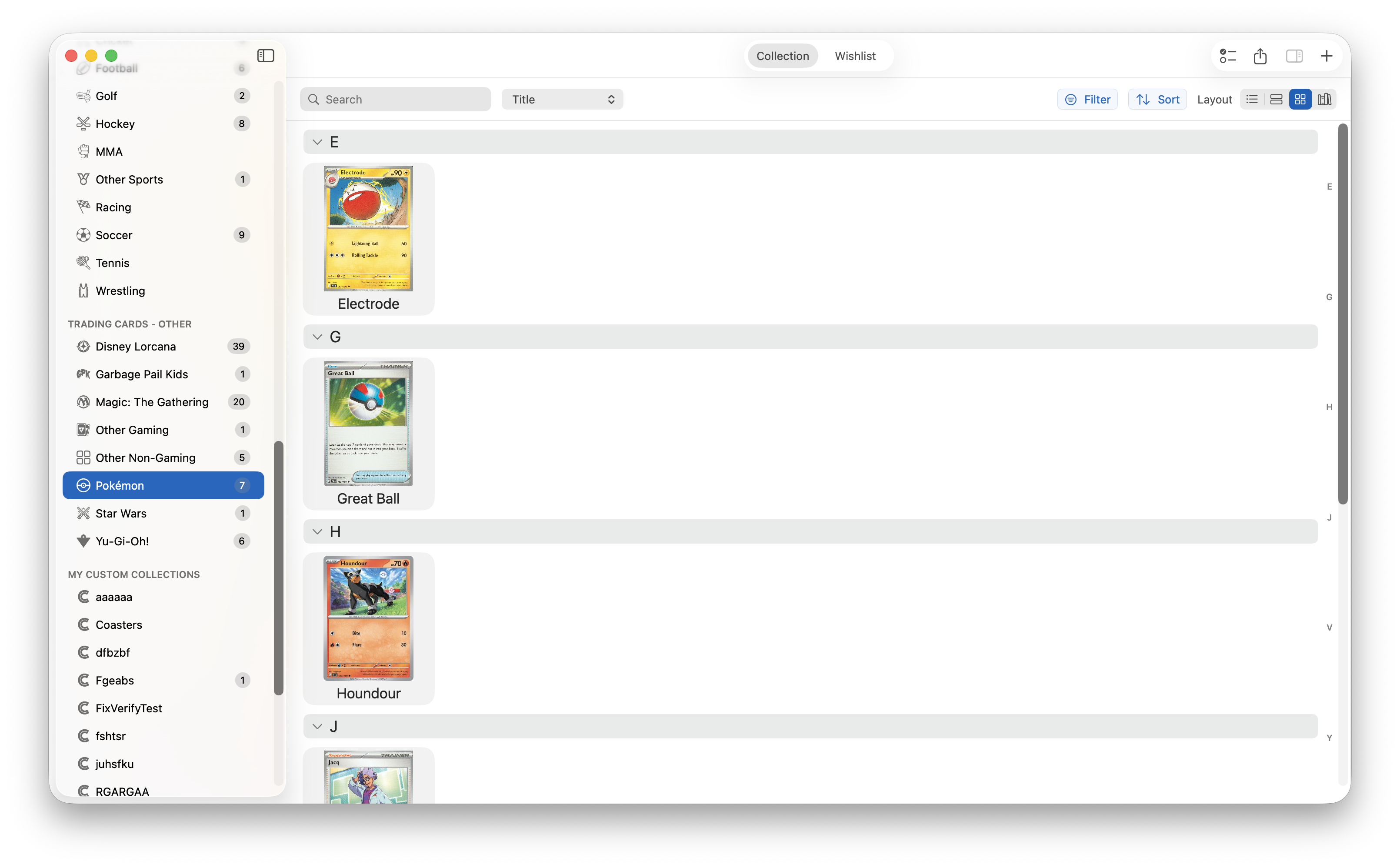
iCollect Everything added full trading card support in 2025, covering Pokemon, Magic: The Gathering, Yu-Gi-Oh!, sports cards, and more. You can scan barcodes on sealed products (booster boxes, Elite Trainer Boxes, tins) or search the built-in database to add singles by card name, set, or card number.
What makes it different: If you collect cards and other things (movies, action figures, video games, whatever), this is the only app where everything lives together. One app, one subscription, one synced collection across all your devices. It also handles the practical side of card collecting well: fields for condition, grading company, grade, and certification number, plus estimated values that update regularly so you have a running sense of what the collection is worth.
Best for: Collectors who want one app for their entire collection. Casual to moderate card collectors who care more about knowing what they own than about minute-by-minute market moves.
Not ideal for: Day traders. If you’re flipping cards weekly and need live market charts, look at Collectr below.
Price: Free to start. Pro unlocks unlimited items and sync.
2. Collectr: Best for Serious TCG Investors
Collectr is built for people who treat trading cards as an investment portfolio. Real-time market valuations, trend analysis, and portfolio performance charts, presented the way a finance app presents a stock portfolio. It supports 25+ TCGs including Pokemon, Magic, Yu-Gi-Oh!, One Piece, and Digimon, which makes it one of the broadest options for people deep into multiple games.
Best for: Card traders and investors who want financial-grade portfolio tracking and care about how their collection’s value moves week to week.
Not ideal for: Casual collectors who just want to catalog what’s in their binders. The investment-focused interface is overkill if you’re not tracking buy and sell prices, and it doesn’t help with anything you collect besides cards.
Price: Free tier available. Pro features for a subscription fee.
3. TCGplayer: Best Marketplace with Built-in Collection Tracking
TCGplayer started as (and still primarily is) a marketplace for buying and selling cards. But the app includes a card scanner and a collection tracking feature that lets you catalog your cards and see their market value based on TCGplayer’s own sales data, which is about as close to “what would this actually sell for” as you can get for the games traded there.
Best for: Collectors who actively buy and sell on TCGplayer. The collection tracker ties directly into the marketplace, so cataloging and listing live in the same place.
Limitation: It’s a marketplace first and a collection tool second. The tracking features aren’t as polished as dedicated apps, and if you collect anything besides cards, you’re out of luck.
Price: Free.
4. Moxfield / Archidekt: Best for Magic: The Gathering Deck Building
If you play competitive Magic, you probably already know Moxfield or Archidekt. They’re deck builders first: you construct and test decks, share them with friends, and track your collection of MTG cards so you know which decks you can actually build from what you own. Moxfield’s collection tracker in particular has gotten really good, and for an MTG player the deck-to-collection connection is something no general card collection app replicates.
Best for: MTG players who want deck building and collection tracking in one place.
Limitation: Magic only. No Pokemon, no Yu-Gi-Oh!, no sports cards. If Magic is one of several games you collect, you’ll need something broader alongside it.
Price: Free to use.
5. CLZ Games: Limited Card Support
CLZ doesn’t have a dedicated trading card app. Their CLZ Games app covers video games, not card games. Some collectors try to shoehorn cards into CLZ’s system with custom entries, but it wasn’t designed for it: no card database, no set lists, no card-specific fields. If you’re weighing the two ecosystems for the rest of your collection, our full iCollect Everything vs CLZ comparison breaks down where each one is stronger.
Comparison: Card App Features
| App | Card coverage | Other collectibles | Value data | Best for |
|---|---|---|---|---|
| iCollect Everything | Pokemon, MTG, Yu-Gi-Oh!, sports cards, more | Yes: movies, games, figures, comics, and more | Estimated values, updated regularly | Collectors and mixed collections |
| Collectr | 25+ TCGs | No | Real-time market valuations | Investors and traders |
| TCGplayer | Games sold on its marketplace | No | Its own marketplace sales data | Active buyers and sellers |
| Moxfield / Archidekt | Magic: The Gathering only | No | Deck-building focus | MTG deck builders |
| CLZ Games | No dedicated card support | Video games | n/a for cards | Not recommended for cards |
The short version: pick Collectr or TCGplayer if cards are a portfolio, Moxfield if Magic decks are your life, and iCollect Everything if cards are one part of a collection you want cataloged properly.


How to Catalog a Big Binder Backlog
The number one reason collectors abandon a card collection app isn’t the app. It’s the backlog. You download something, look at four binders and two shoeboxes, add nine cards, and never open it again. Here’s the workflow that actually gets a few thousand cards into a database:
- Triage before you type. Separate cards that matter from bulk. Holos, full arts, alt arts, rookies, autographs, numbered parallels, and anything already sleeved or toploaded go in one pile. Bulk commons go in another. You are not going to catalog 3,000 bulk commons individually, and you shouldn’t.
- Enter the hits first. Start with the pile that has real value. You get momentum, and you cover the cards that actually need documentation for insurance or resale. If you’re sorting Pokemon and aren’t sure where the line is, our guide on whether your Pokemon cards are worth anything walks through the physical details (set symbols, 1st Edition stamps, holo patterns) that separate the $2 cards from the $200 ones.
- Work set by set, not binder by binder. Database searching is fastest when you stay inside one set. Pull every Evolving Skies card across all your binders, enter them by card number in one run, then move to the next set. Card numbers are printed on the card for exactly this reason.
- Log bulk as lots. One entry that says “Scarlet & Violet bulk, roughly 800 commons and uncommons” preserves the information you actually need without eating a month of evenings.
- Record locations as you go. “Binder 3, page 12” or “white 800-count box, closet shelf” in the notes field turns your app into a finding aid, not just a list. Future you, digging for one card to sell, will be grateful.
- Do values later. The first pass is inventory, not appraisal. Get the cards in; the value estimates attach themselves and update over time.
- Set a session rhythm. Twenty to thirty minutes a night, or one shoebox per weekend. A 5,000-card backlog sounds impossible, but at a steady pace it clears in a couple of months.
Tracking Graded Cards and Slabs
Graded cards are their own inventory problem. A PSA 10 and a raw copy of the same card are different objects with wildly different values, and your records need to treat them that way. The gap between a raw near-mint card and the same card in a top grade is often several multiples of the price, which is exactly why the two should never blur together in your database.
A few habits worth building:
- Record the certification number. Every PSA, CGC, and BGS slab carries a unique cert number. Log it. It lets you verify the card on the grader’s website, prove ownership for insurance, identify a slab if it’s ever stolen, and drop the number straight into a listing when you sell. iCollect Everything has dedicated fields for grading company, grade, and cert number, so this takes seconds per slab.
- Keep grader and grade as separate details. “PSA 9” and “BGS 9” are not the same thing to buyers. Recording them separately keeps your collection searchable and your value tracking honest.
- Track raw and graded copies side by side. If you own a raw copy and a graded copy of the same card, enter both. That’s not a duplicate; it’s two assets.
- Photograph your slabs. Front and back, cert label visible. Between the photos and the cert numbers, you have an insurance file that would take an afternoon to reconstruct otherwise.
Frequently Asked Questions
What is the best trading card collection app?
It depends on how you collect. For most collectors, especially anyone who collects more than one game or more than just cards, iCollect Everything is the best all-around choice. For investors focused on portfolio value, Collectr. For Magic players who build decks, Moxfield. There’s no single best app, which is why the decision guide at the top of this post starts with the collector, not the app.
Can I scan Pokemon card barcodes?
Sealed Pokemon products (booster packs, Elite Trainer Boxes, tins) have barcodes, and you can scan those with iCollect Everything. Individual singles don’t have barcodes at all, in any app, so singles get added by searching the database by card name, set, or card number.
Which app has the most accurate card prices?
For real-time market pricing, Collectr and TCGplayer pull from actual sales data. iCollect Everything provides estimated values that update regularly: accurate enough for collection tracking and insurance documentation, but not meant for active trading decisions. For anything expensive, check recent sold listings yourself before buying or selling.
Is there a free trading card collection app?
iCollect Everything, Collectr, TCGplayer, and Moxfield all have free tiers. iCollect Everything’s free tier lets you track cards alongside all your other collectibles, then upgrade if you outgrow it.
Can I track graded cards (PSA, CGC, BGS)?
Yes. iCollect Everything has fields for grading company, grade, and certification number, and you can track raw and graded cards together in the same collection. Recording cert numbers is worth the extra ten seconds per slab; see the slab-tracking section above for why.
What’s the best app for sports cards?
Sports cards need fields that TCG-focused apps don’t prioritize: parallels, serial numbering, rookie designations, and heavy grading activity. iCollect Everything tracks sports cards alongside TCGs, and we’ve covered the category in depth in our sports card database app guide.
Can one app track Pokemon, Magic, and Yu-Gi-Oh! together?
Yes. iCollect Everything and Collectr both cover multiple games in one collection. Moxfield can’t (Magic only), and TCGplayer’s tracking is built around what its marketplace sells. If your household plays two or three different games, a multi-TCG app saves you from juggling separate databases.
Do I need to catalog every single card I own?
No, and trying to is the fastest way to quit. Catalog individually anything with meaningful value or personal significance, and log bulk commons as lots (“about 600 commons, box 2”). Your database should answer “what do I own and what is it worth,” and a thousand fifty-cent commons don’t change either answer much.
Keep Exploring
- Collecting beyond cards? The best collection management apps comparison covers every category.
- Comics in the same boxes? See the best comic book collection app guide.
