
At some point, every movie collector has the same experience. You’re at a garage sale or scrolling through a deal online and you think, “Wait… do I already own this?” You check your memory. You check your gut. You buy it anyway. And when you get home, there it is — sitting on your shelf. Duplicate #47.
There’s a better way. Whether you’ve got 50 DVDs or 5,000 Blu-rays, cataloging your collection doesn’t have to be painful. Here’s how to do it right.
The Spreadsheet Problem
Most people start with a spreadsheet. Makes sense — it’s free, it’s flexible, you control everything. But spreadsheets hit a wall fast:
- No barcode scanning. You’re typing every title by hand.
- No cover art. Just rows of text that all look the same.
- No automatic details. You have to look up the year, director, rating, and format yourself.
- No sync. Your spreadsheet lives on one device. Standing in a store trying to remember if you own a movie? Good luck.
- No value tracking. What’s your collection worth? The spreadsheet has no idea.
After about 200 movies, maintaining a spreadsheet becomes its own hobby. Not in a good way.
The App Approach: Scan, Auto-Fill, Done
Modern collection apps — including iCollect Everything — work like this:
Step 1: Scan the barcode. Point your phone camera at the barcode on your DVD, Blu-ray, or 4K case. Takes about one second.
Step 2: Details auto-fill. The app pulls the title, year, director, actors, rating, runtime, cover art, and format from its database. No typing.
Step 3: Tweak and save. Add personal notes (where you bought it, condition, whether you’ve watched it). Hit save. Done.
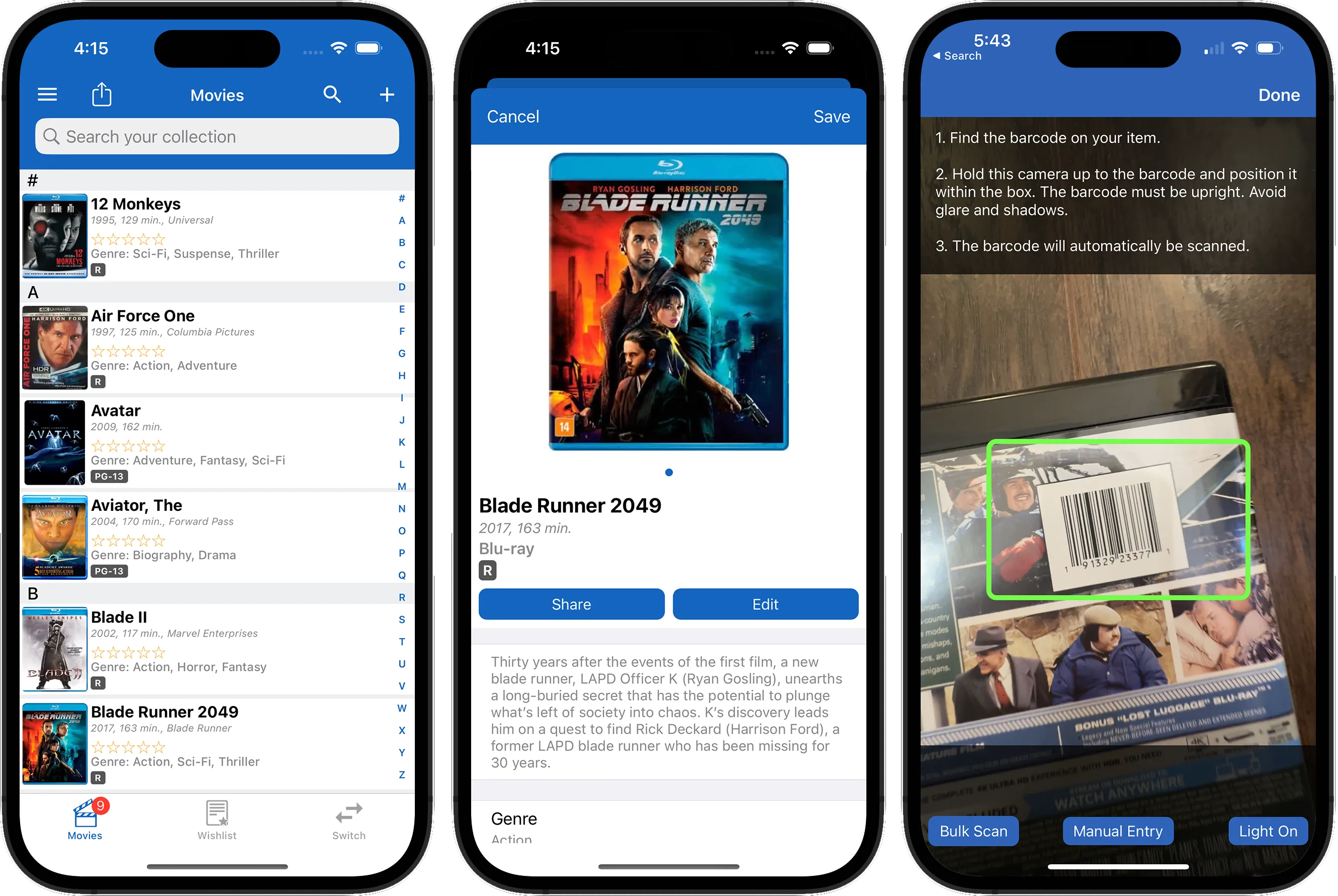
An afternoon of scanning can catalog hundreds of movies. One of our users — an 83-year-old grandmother, according to her App Store review — scanned her husband’s entire 121-DVD collection “in a matter of a few hours.” Her words, not ours.
What About Movies Without Barcodes?
Older DVDs, imported discs, and digital copies sometimes don’t have scannable barcodes. For those:
Search by title. Type the movie name and the app searches its database. Pick the right edition and format.
AI Auto-Fill. iCollect Everything can identify movies from a photo of the case or disc. The AI reads the cover art and fills in what it finds. Not perfect for every obscure title, but it handles mainstream releases well.
Manual entry. For truly rare items, you can enter details by hand. Add your own photos, notes, and custom fields.
Organizing Your Catalog
Once your movies are scanned, the fun part starts. Sort by:
- Format — see all your 4K UHD discs separate from DVDs
- Genre — browse just your horror collection or comedies
- Director — find every Spielberg or Nolan film you own
- Year — your 80s collection vs your 2020s pickups
- Value — see which titles are worth the most
- Wishlist — track what you want but don’t have yet
Tracking Your Collection’s Value
This surprises a lot of collectors: your movie collection might be worth more than you think. Out-of-print Blu-rays, limited steelbooks, and certain box sets can appreciate significantly.
iCollect Everything provides automatic estimated values that update regularly. You can see your total collection value at a glance — useful for insurance purposes, or just for bragging rights.
Sharing Your Collection
Built a catalog you’re proud of? iCollect Everything lets you share your collection via a web link that anyone can browse — no app download needed. Send it to friends, post it on forums, or use it to coordinate trades with other collectors.
Which App Should You Use?
For movies specifically, you have two main options:
iCollect Everything — handles movies plus 25+ other collection types. Free tier available. Best if you collect movies along with other things.
CLZ Movies — movie-only app with deep IMDb integration. Subscription required. Best if movies are your only collection.
We’re biased, obviously. But our honest take: most movie collectors also have books, games, or other collections. Starting with an app that handles everything saves you from switching later.


Getting Started
Download iCollect Everything (free on iPhone and Android), grab a stack of movies off your shelf, and start scanning. You’ll be surprised how satisfying it is to see your whole collection organized, searchable, and valued — all from your phone.
Frequently Asked Questions
What’s the best app to catalog my DVD collection?
iCollect Everything lets you catalog DVDs, Blu-rays, 4K UHDs, and VHS tapes by scanning barcodes or searching by title. It auto-fills cover art, cast, crew, and format details.
Can I scan movie barcodes with my phone?
Yes. iCollect Everything uses your phone’s camera as a barcode scanner. Point it at any DVD, Blu-ray, or 4K UHD case and the details fill in automatically.
Is there a free movie collection app?
iCollect Everything has a free tier that lets you start cataloging right away. Pro unlocks unlimited items, cloud sync, and estimated values.
How do I know what my movie collection is worth?
iCollect Everything includes estimated market values that update automatically. You can see your total collection value or drill into individual titles.
