
If you collect things — movies, books, vinyl records, action figures, whatever — you’ve probably hit that point where a spreadsheet just doesn’t cut it anymore. Maybe you tried a Notes app. Maybe you gave up and just “know what you have.” (Spoiler: you don’t. Nobody does after 200+ items.)
We’ve been building iCollect Everything since 2013, so we’ve watched this space closely. Here’s an honest look at the best collection management apps available right now, including where we think our own app fits — and where the competition does things differently.
What Actually Matters in a Collection App
Before we get into specific apps, here’s what separates a good collection tool from a bad one:
Barcode scanning that works. If you can’t point your phone at a DVD, book, or toy box and have it auto-fill the details, you’re wasting time. Some apps claim barcode scanning but their databases are so thin that half your scans come back empty.
Cross-device sync. You scan items on your phone at a thrift store. You want to see them on your Mac when you get home. If the app doesn’t sync between iPhone, Android, and desktop, that’s a dealbreaker for most collectors.
Coverage. Do you collect just one thing? Or are you the kind of person with 300 DVDs, 50 board games, and a growing shelf of Funko Pops? Some apps only handle one category. Others try to do everything.
The Apps, Ranked
1. iCollect Everything — Best for Multi-Category Collectors
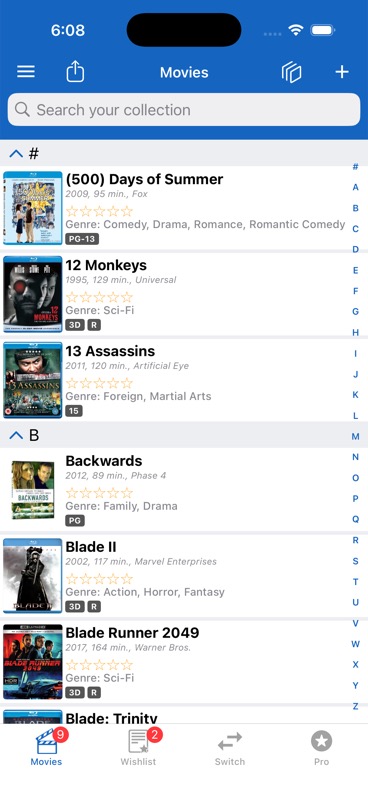
Yeah, we’re biased. But here’s the thing: iCollect Everything is the only app that handles 25+ collectible types in a single app. Movies, books, music, comics, video games, action figures, trading cards, stamps, LEGO, wine, coins, dolls, Hot Wheels — all in one place, with one subscription.
Why collectors pick it:
- Barcode scanning with a massive database (movies, books, games, and toys all covered)
- AI Auto-Fill for items that don’t have barcodes — snap a photo and the app fills in the details
- Estimated market values that update automatically
- Works on iPhone, iPad, Android, Mac, Windows, and the web
- Free tier available — no credit card required to start
- Custom collections for anything not in the preset categories
Where it falls short: If you’re a hardcore specialist in one category (like a competitive Magic: The Gathering player who needs real-time card pricing to the penny), a dedicated TCG app might serve you better. iCollect is built for collectors, not traders.
Price: Free to start. Pro subscription unlocks unlimited items, cloud sync, and advanced features.

2. CLZ Apps — Best for Media Collectors Who Don’t Mind Separate Apps
CLZ (by Collectorz.com) has been around even longer than we have. They make five separate apps: CLZ Movies, CLZ Comics, CLZ Books, CLZ Music, and CLZ Games. Each one is focused and polished.
The good: Their databases for movies and comics are excellent. They license IMDb data for movies, which gives them deep cast/crew info. The apps are mature and reliable.
The catch: You need a separate subscription for each category. If you collect movies AND comics AND books, that’s three subscriptions. There’s no single “do everything” option. They also don’t cover action figures, toys, stamps, LEGO, wine, or any of the other non-media categories.
Price: Around $1.99/month per app, or $14.99/year per app. Collecting across five categories = $75/year.
3. Sortly — Best for General Inventory (Not Collector-Specific)
Sortly is really an inventory management tool, not a collector app. It’s popular with small businesses tracking equipment and supplies. You can use it for collections, but it won’t auto-fill details from a barcode scan — you’re manually entering everything.
Good for: People who want a visual inventory with photos and QR codes.
Not great for: Anyone who expects barcode scanning to pull up “The Shawshank Redemption, 1994, Rated R, directed by Frank Darabont” automatically.
Price: Free tier (100 items). Advanced plans start at $29/month — priced for businesses, not hobbyists.
4. Kolekto — The Newer Challenger
Kolekto positions itself as “by collectors, for collectors.” It has a clean, modern interface and won some app design awards. It’s newer to the market, which means a smaller database but fresher design.
Good for: Collectors who want a polished mobile experience.
Limitations: Smaller database means more manual entries. Fewer supported platforms than iCollect or CLZ.
5. Libib — Best Free Option for Books Only
If you only collect books and want something completely free, Libib is worth a look. It’s basically a personal library catalog. Scan a book’s ISBN, and it pulls in the cover, author, and description. Simple and effective for that one use case.
Doesn’t work for: Anything that isn’t a book. No movies, no games, no toys.
Quick Comparison Table